Redesigning two core enterprise device management platforms through an architectural revamp and reimagined design.
MY ROLE
Product Designer
CLIENT
AT&T
SCOPE
Enterprise Products
METHODS
Participatory Design
TL;DR
AT&T's Device Enrollment Center had grown into a friction-heavy system across two portals, one for admins, one for customers, supporting $960M in revenue and 1.5M device enrollments annually. As the sole designer, I led the end-to-end redesign: auditing existing flows, collaborating weekly with product, architecture, and engineering, and designing around the real constraints of third-party enrollment programs and agentic AI integration to deliver two smarter, leaner platforms.
✺ CONTEXT
Outdated portals were creating friction for the teams and customers relying on them daily.
The Device Enrollment Center has an AT&T internal portal and an external facing customer portal. Both had accumulated years of structural debt. Manual workflows, redundant navigation, and no intelligent assistance made routine tasks harder than they needed to be.
Platform statistics: 1.5M device enrollments, 11.2K monthly visitors, 26.6K participating customers, $960M in supported revenue
✺ OUR PROBLEM STATEMENT
✺ THE OPPORTUNITY
An IBM-led AI workshop identified a significant opportunity for automation, and a redesign became the natural companion.
The workshop surfaced what the platform friction had been pointing to for some time: agents could meaningfully automate high-effort admin workflows. With a budget allocated and an architectural revamp already underway, both portals were scoped for a ground-up redesign alongside the AI implementation.
Interactive before and after: manual process today vs new agentic experience
✺ UNDERSTANDING THE PROBLEM SPACE
A multi-pronged audit uncovered friction across every layer of both portals.
I interviewed the admin team, who carry deep institutional knowledge of customer pain points, mapped every user flow across both portals in Figma, and shadowed admins to observe workflows firsthand.

User flow mapping example (1 out of 5)
✺ WHAT THE AUDIT REVEALED
The pain points were structural, not surface level.
Not every friction point carries equal weight. Across both portals, four themes emerged on each side with the highest impact on day-to-day operations.
Pain points from the UX audit, customer and admin portals
Navigation is repetitive and convoluted
Multiple pathways to the same task with no clear starting point.
Excess pages with low or no value
Pages like "Learn More" add friction without actionable guidance.
Critical paths hidden behind unnecessary steps
Registration and primary actions buried under deep navigation layers.
Disjointed user experience
Redundant information and step-heavy flows push customers toward manual support instead of self-service.
Homepage offers no operational visibility
No alerts, task prioritization, or system activity insight.
Partner programs duplicated across separate pages
ABM, Knox, and Zero Touch share identical functionality but live on separate pages.
Device tracking and queries are entirely manual
Admins scan raw transaction logs for errors and replace placeholder code in a text-only query interface with no UI support.
High manual burden and cognitive load
Nearly all workflows rely on manual data entry, log scanning, and code replacement.
✺ UNDERSTANDING TECHNICAL CAPABILITIES AND CONSTRAINTS
Weekly collaboration with architecture and engineering shaped what the designs could, and couldn't, do.
The most significant constraint came from the third-party enrollment programs: Apple Business Manager, Android Zero Touch, and Samsung Knox each require different data inputs and return different data structures. This created a design challenge on both portals: how to present a coherent, unified experience across fundamentally heterogeneous data sources. I also had to determine where AI agents could be integrated in ways that added genuine value without disrupting existing workflows.
Feature Highlights Admin ⟢
Admin Portal - IMEI Intelligence Page
A dedicated IMEI page replaces manual log scanning with a clear, trustworthy view of the selected device.
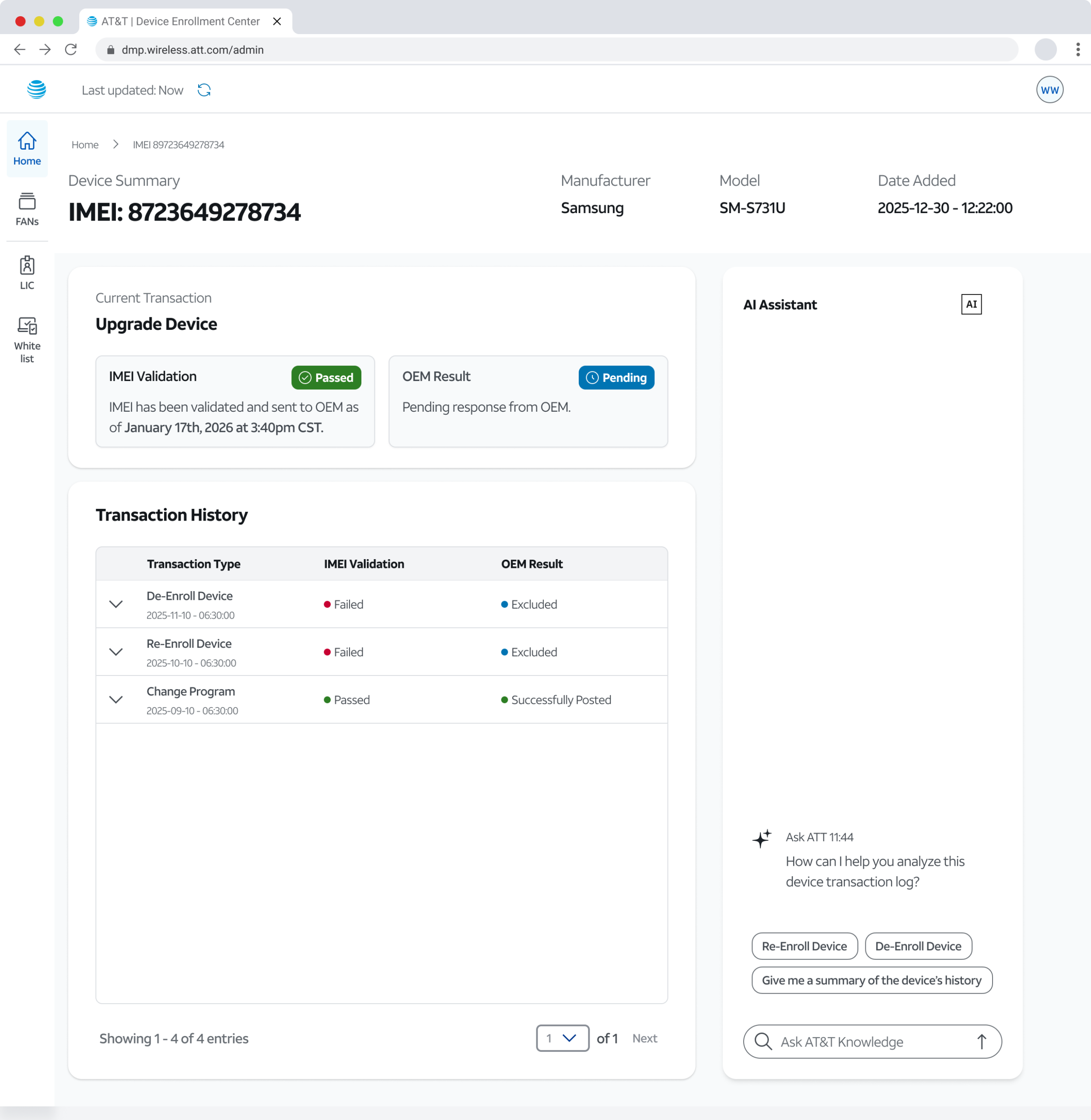
Final design screenshot [Identifying data has been scrubbed]
Before, troubleshooting an IMEI meant manually scanning raw JSON log files, then working backward across multiple systems to reconstruct what happened. There was no single place to see the full picture.
Key Features:
☆ Quick statuses, timestamps, and natural language descriptors replace opaque JSON.
☆ Progressive disclosure surfaces detail on demand.
☆ An AI chat interface lets admins query device history conversationally and trigger actions, enrollment, de-enrollment, and more, without leaving the page.
Trust is embedded throughout: success and failure states are explicit, transaction validations include descriptive text and step indicators, and pending states are called out in plain language. This also serves a change management function — easing admins into an AI-assisted workflow with the transparency needed to build confidence in the system.
Feature Highlights Customer ⟢
Customer Portal — Redesigned Authenticated User Homepage
A personalized homepage, organized entirely around what users actually come to do.
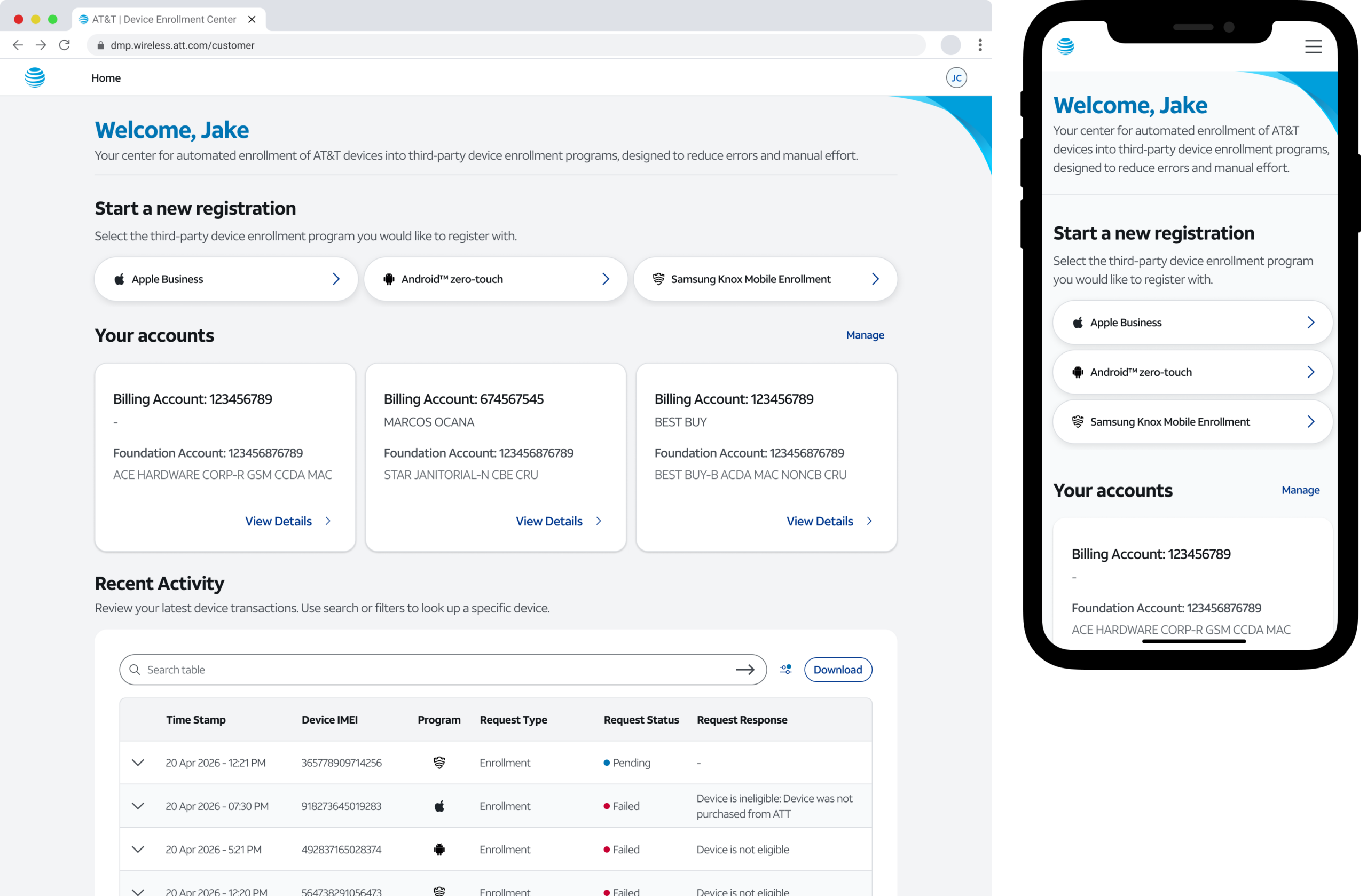
Web and Mobile Responsive [Identifying data has been scrubbed]
Previously, authenticated users landed on the same generic page as visitors — no personalization, no clear call to action, with registration buried several clicks deep.
Now, the primary action is the first thing a user sees. A greeting and clear site context anchor the top. Start a Registration surfaces immediately as the first card. Below it, an Accounts section gives users a high-level view of all associated accounts. A Recent Activity table closes the page for users who return to troubleshoot.
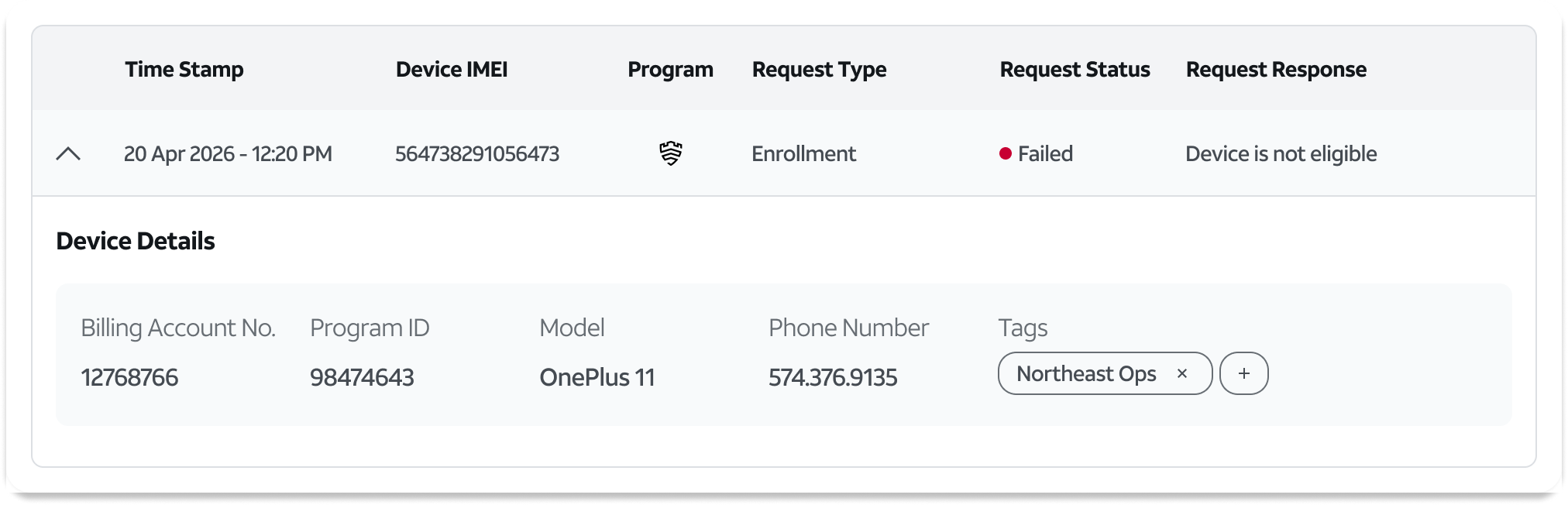
Data variance across programs required a flexible table design
Apple Business Manager, Android Zero Touch, and Samsung Knox each return different data. Shared fields surface at the row level with program logos for immediate context — expanding a row reveals program-specific details without cluttering the default view.
✺ CUSTOM COMPONENTS AND DESIGN SYSTEM
The designs are built on the client's existing design system, extended with custom components where the system fell short.
Custom components were built for novel interaction patterns the existing system didn't account for. The agentic AI chat interface, the complex data table pattern, and various progressive disclosure patterns were all net-new — designed from scratch and built to extend the existing design system rather than diverge from it.
The clien't design system is confidential and internal so no photo - sorry!
✺ OUTCOMES & RECEPTION
Stakeholder reception has been strongly positive ahead of production launch.
The sales team called the customer portal a major improvement over the current state. The admin portal was consistently met with feedback that it would meaningfully reduce time spent on manual workflows. The product team aligned quickly, citing clarity and usability as the primary strengths.
Take a look at my other projects 𓀙
Designing a tool to enhance production operationsIBM Consulting
Shaping the future of Ulta Events through UXRIBM Consulting
Building a custom tool for manufacturing operationsIBM Consulting

JM Product VisionIBM Consulting